The forum is currently inactive due to too much AI spam.
EVC2 Beta Software

Quote from elmor on 2021-12-02, 17:23Quote from sunrein on 2021-12-02, 15:45The device shows up as EVC 2.0.
I have flashed the newest Firmware (L4).
Ok this means the WinUSB driver is not automatically installed for some reason. I think you need to remove this registry entry (SkipContainerIdQuery) in folder HKEY_LOCAL_MACHINE\SYSTEM\CurrentControlSet\Control\usbflags\048357400200 . Then re-plug the EVC2 and hopefully it will enumerate correctly.
Quote from sunrein on 2021-12-02, 15:45The device shows up as EVC 2.0.
I have flashed the newest Firmware (L4).
Ok this means the WinUSB driver is not automatically installed for some reason. I think you need to remove this registry entry (SkipContainerIdQuery) in folder HKEY_LOCAL_MACHINE\SYSTEM\CurrentControlSet\Control\usbflags\048357400200 . Then re-plug the EVC2 and hopefully it will enumerate correctly.
Uploaded files: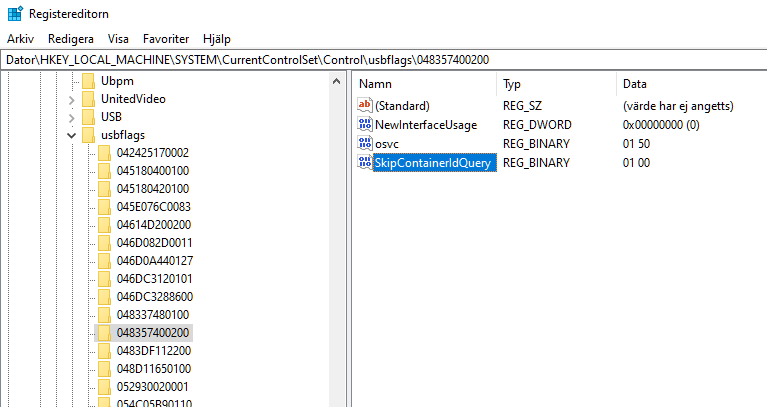

Quote from sunrein on 2021-12-03, 16:57Hi @elmor,
it is working now. If someone has the same problem, this is how I have solved it:
* Put all registry-keys like elmor has posted above ("HKEY_LOCAL_MACHINE\SYSTEM\CurrentControlSet\Control\usbflags\048357400200").
* (Default) -> was already present
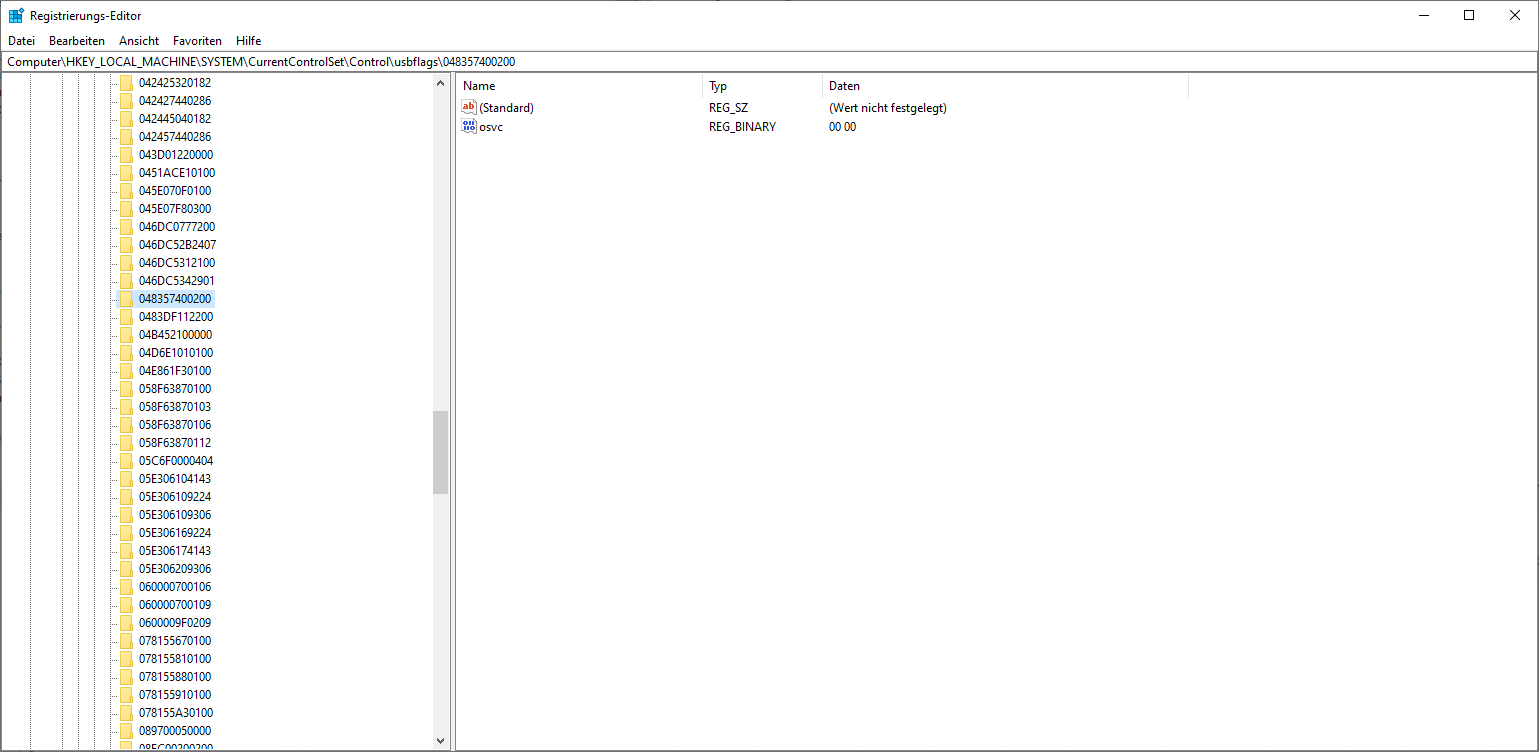
* osvc -> was present but with the value 00 00 -> changed to 01 50
* NewInterfaceUsage -> create from new DWORD
* SkipContainerIDQuery -> create from new BINARY with value 01 00
* Deinstall the EVC 2.0 in the Device-manager
* Unplug and replug it again
* Device should now be registered as "Win Usb-Device"
* Start EVC2 Software in Admin-Mode
One question while using it: Can I somehow Log the PMD Data to a File?
Thanks!
Hi @elmor,
it is working now. If someone has the same problem, this is how I have solved it:
* Put all registry-keys like elmor has posted above ("HKEY_LOCAL_MACHINE\SYSTEM\CurrentControlSet\Control\usbflags\048357400200").
* (Default) -> was already present
* osvc -> was present but with the value 00 00 -> changed to 01 50
* NewInterfaceUsage -> create from new DWORD
* SkipContainerIDQuery -> create from new BINARY with value 01 00
* Deinstall the EVC 2.0 in the Device-manager
* Unplug and replug it again
* Device should now be registered as "Win Usb-Device"
* Start EVC2 Software in Admin-Mode
One question while using it: Can I somehow Log the PMD Data to a File?
Thanks!
Quote from elmor on 2021-12-04, 20:11Quote from sunrein on 2021-12-03, 16:57Hi @elmor,
it is working now. If someone has the same problem, this is how I have solved it:
* Put all registry-keys like elmor has posted above ("HKEY_LOCAL_MACHINE\SYSTEM\CurrentControlSet\Control\usbflags\048357400200").
* (Default) -> was already present
* osvc -> was present but with the value 00 00 -> changed to 01 50
* NewInterfaceUsage -> create from new DWORD
* SkipContainerIDQuery -> create from new BINARY with value 01 00
* Deinstall the EVC 2.0 in the Device-manager
* Unplug and replug it again
* Device should now be registered as "Win Usb-Device"
* Start EVC2 Software in Admin-Mode
One question while using it: Can I somehow Log the PMD Data to a File?
Thanks!
Hello, I'm glad you found a solution and thank you for sharing it in case others have this issue.
You can log PMD data to file by using the Data Logger function. Right click the graph you want to log and select "Add to data logger". Then under EVC2.0 press the Data Logger button.
Quote from sunrein on 2021-12-03, 16:57Hi @elmor,
it is working now. If someone has the same problem, this is how I have solved it:
* Put all registry-keys like elmor has posted above ("HKEY_LOCAL_MACHINE\SYSTEM\CurrentControlSet\Control\usbflags\048357400200").
* (Default) -> was already present
* osvc -> was present but with the value 00 00 -> changed to 01 50
* NewInterfaceUsage -> create from new DWORD
* SkipContainerIDQuery -> create from new BINARY with value 01 00
* Deinstall the EVC 2.0 in the Device-manager
* Unplug and replug it again
* Device should now be registered as "Win Usb-Device"
* Start EVC2 Software in Admin-Mode
One question while using it: Can I somehow Log the PMD Data to a File?
Thanks!
Hello, I'm glad you found a solution and thank you for sharing it in case others have this issue.
You can log PMD data to file by using the Data Logger function. Right click the graph you want to log and select "Add to data logger". Then under EVC2.0 press the Data Logger button.

Quote from Moritz Maira Jerkel on 2021-12-14, 20:36Greetings from Germany!
Hi, @elmor,
i recently bought a few of your products:2x KTHs, 1xPMd, 1xEVC2SX, 1xEFC...and 2 thermal Pads. I'have not testet the EFC, but the quality seems very nice.
I wanted to dig into CPU/GPU power consumption during gaming and other tasks, so I need the PMD to monitor(log) it.
Currently I have both PCIe Kable running through PCIe2...and the EPS Kabel through EPS1.
I plan on using a Riser cable and a 24-Pin extension to monitor the power consumption going into the Board(24Pin) and into the GPU(over PCIe-Slot) too....different topic.
And now my problem. 😉
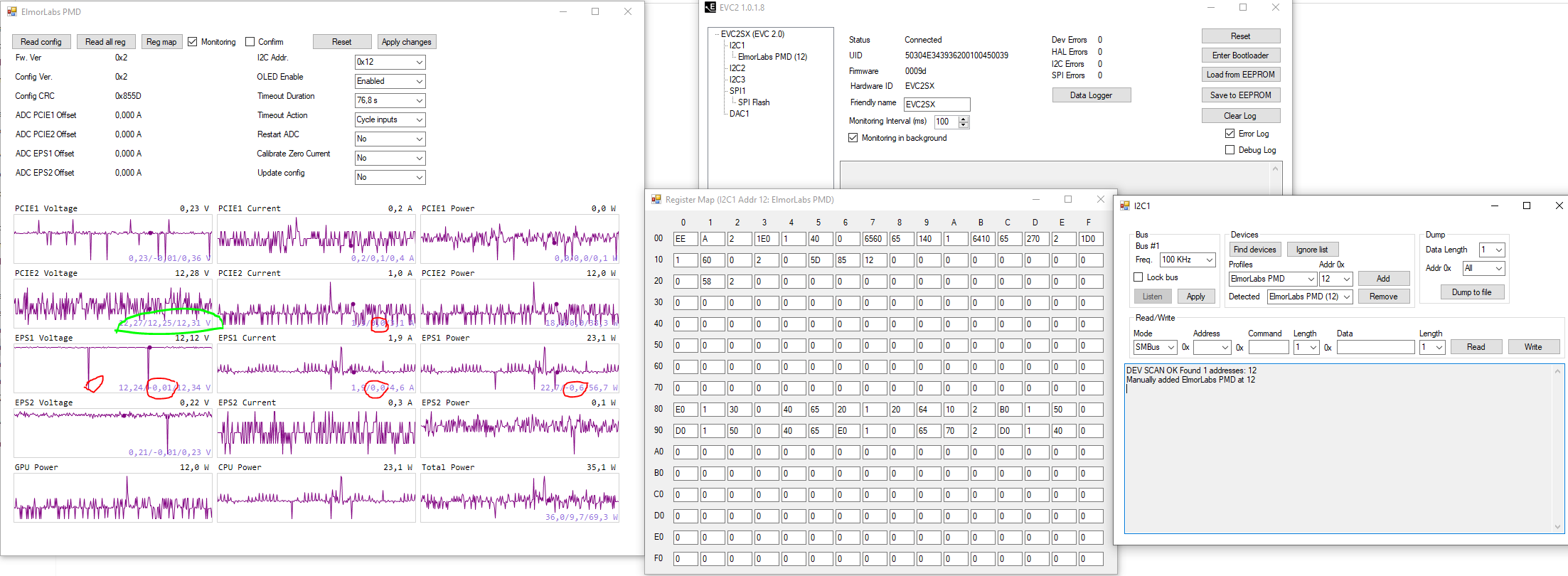
When I'm looking at the OLED, the numbers do make sense. But when monitoring it with the EVC2 Software, the voltage and current are fluctuating down to -0,01V and 0A.
I can log it with the Data logger, but that is of no use, if the numbers are wrong.
I tried all of this:
[spoiler title=""]
Use I2C2
try 400kHz(Ack Error, and PMD can not be found)
try different monitoring intervalls..100ms to 2000ms
try USB at the i/o shield instead of front USB.
restart, unplug, replug, power off, etc.
took of the OLED
run software as Admin
play with software settings, but I have to admit, that I have little idea what I'm doing. 😉 I tried to learn about it, but before I bought your products, I had never heard of I2C.
Windows high performance mode and USB saving disabled
I tried this one too:
Quote from sunrein on 2021-12-03, 16:57* Deinstall the EVC 2.0 in the Device-manager
* Unplug and replug it again
* Device should now be registered as "Win Usb-Device"
* Start EVC2 Software in Admin-Mode
But for me, it stays as EVC 2.0 in the Device manager(up to date windows 10)
System is a Ryzen 1800X on an X370 Asus Crosshair VI Hero, Vega64, BeQuiet DarkPower 850W, 2x16GB Crucial Ballistix...Watercooling etc.
[/spoiler]
I tried to put all the information on one screen....I hope it helps to understand the problem:
Greetings from Germany!
Hi, @elmor,
i recently bought a few of your products:2x KTHs, 1xPMd, 1xEVC2SX, 1xEFC...and 2 thermal Pads. I'have not testet the EFC, but the quality seems very nice.
I wanted to dig into CPU/GPU power consumption during gaming and other tasks, so I need the PMD to monitor(log) it.
Currently I have both PCIe Kable running through PCIe2...and the EPS Kabel through EPS1.
I plan on using a Riser cable and a 24-Pin extension to monitor the power consumption going into the Board(24Pin) and into the GPU(over PCIe-Slot) too....different topic.
And now my problem. 😉
When I'm looking at the OLED, the numbers do make sense. But when monitoring it with the EVC2 Software, the voltage and current are fluctuating down to -0,01V and 0A.
I can log it with the Data logger, but that is of no use, if the numbers are wrong.
I tried all of this:
Use I2C2
try 400kHz(Ack Error, and PMD can not be found)
try different monitoring intervalls..100ms to 2000ms
try USB at the i/o shield instead of front USB.
restart, unplug, replug, power off, etc.
took of the OLED
run software as Admin
play with software settings, but I have to admit, that I have little idea what I'm doing. 😉 I tried to learn about it, but before I bought your products, I had never heard of I2C.
Windows high performance mode and USB saving disabled
I tried this one too:
Quote from sunrein on 2021-12-03, 16:57* Deinstall the EVC 2.0 in the Device-manager
* Unplug and replug it again
* Device should now be registered as "Win Usb-Device"
* Start EVC2 Software in Admin-Mode
But for me, it stays as EVC 2.0 in the Device manager(up to date windows 10)
System is a Ryzen 1800X on an X370 Asus Crosshair VI Hero, Vega64, BeQuiet DarkPower 850W, 2x16GB Crucial Ballistix...Watercooling etc.
I tried to put all the information on one screen....I hope it helps to understand the problem:
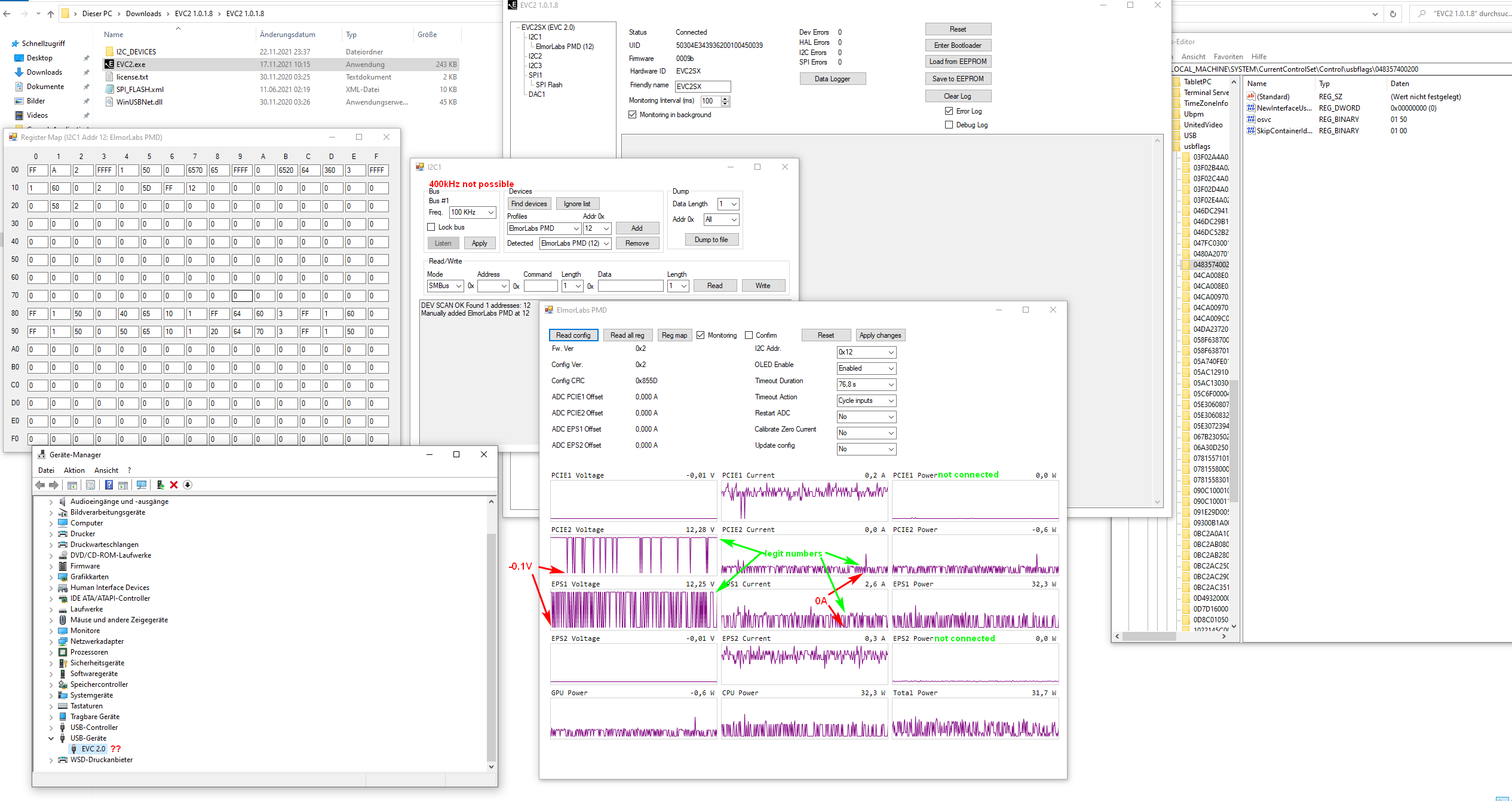
Quote from elmor on 2021-12-14, 23:00Quote from Moritz Maira Jerkel on 2021-12-14, 20:36Greetings from Germany!
Hi, @elmor,
i recently bought a few of your products:2x KTHs, 1xPMd, 1xEVC2SX, 1xEFC...and 2 thermal Pads. I'have not testet the EFC, but the quality seems very nice.
I wanted to dig into CPU/GPU power consumption during gaming and other tasks, so I need the PMD to monitor(log) it.
Currently I have both PCIe Kable running through PCIe2...and the EPS Kabel through EPS1.
I plan on using a Riser cable and a 24-Pin extension to monitor the power consumption going into the Board(24Pin) and into the GPU(over PCIe-Slot) too....different topic.
And now my problem.
When I'm looking at the OLED, the numbers do make sense. But when monitoring it with the EVC2 Software, the voltage and current are fluctuating down to -0,01V and 0A.
I can log it with the Data logger, but that is of no use, if the numbers are wrong.
I tried all of this:
[spoiler title=""]
Use I2C2
try 400kHz(Ack Error, and PMD can not be found)
try different monitoring intervalls..100ms to 2000ms
try USB at the i/o shield instead of front USB.
restart, unplug, replug, power off, etc.
took of the OLED
run software as Admin
play with software settings, but I have to admit, that I have little idea what I'm doing.
I tried to learn about it, but before I bought your products, I had never heard of I2C.
Windows high performance mode and USB saving disabled
I tried this one too:
Quote from sunrein on 2021-12-03, 16:57* Deinstall the EVC 2.0 in the Device-manager
* Unplug and replug it again
* Device should now be registered as "Win Usb-Device"
* Start EVC2 Software in Admin-Mode
But for me, it stays as EVC 2.0 in the Device manager(up to date windows 10)
System is a Ryzen 1800X on an X370 Asus Crosshair VI Hero, Vega64, BeQuiet DarkPower 850W, 2x16GB Crucial Ballistix...Watercooling etc.
[/spoiler]
I tried to put all the information on one screen....I hope it helps to understand the problem:
Hello Moritz,
Connection, driver etc looks all ok (name should still be EVC 2.0, just that the driver is WinUSB). It seems to be an issue with reading the data properly over I2C (betwen EVC2 and PMD). 400 KHz should work as well. I will have a look on my side and see what the possible issues could be. One additional thing you could try is to update to the 0009b firmware here as you should have the EVC2SX-L4 version? https://elmorlabs.com/forum/topic/evc2-beta-firmware/ . You may need to use an alternative software to flash the firmware: https://www.st.com/en/development-tools/stm32cubeprog.html
/Jon
Quote from Moritz Maira Jerkel on 2021-12-14, 20:36Greetings from Germany!
Hi, @elmor,
i recently bought a few of your products:2x KTHs, 1xPMd, 1xEVC2SX, 1xEFC...and 2 thermal Pads. I'have not testet the EFC, but the quality seems very nice.
I wanted to dig into CPU/GPU power consumption during gaming and other tasks, so I need the PMD to monitor(log) it.
Currently I have both PCIe Kable running through PCIe2...and the EPS Kabel through EPS1.
I plan on using a Riser cable and a 24-Pin extension to monitor the power consumption going into the Board(24Pin) and into the GPU(over PCIe-Slot) too....different topic.
And now my problem.
When I'm looking at the OLED, the numbers do make sense. But when monitoring it with the EVC2 Software, the voltage and current are fluctuating down to -0,01V and 0A.
I can log it with the Data logger, but that is of no use, if the numbers are wrong.
I tried all of this:
SpoilerUse I2C2
try 400kHz(Ack Error, and PMD can not be found)
try different monitoring intervalls..100ms to 2000ms
try USB at the i/o shield instead of front USB.
restart, unplug, replug, power off, etc.
took of the OLED
run software as Admin
play with software settings, but I have to admit, that I have little idea what I'm doing.
Windows high performance mode and USB saving disabled
I tried this one too:
Quote from sunrein on 2021-12-03, 16:57* Deinstall the EVC 2.0 in the Device-manager
* Unplug and replug it again
* Device should now be registered as "Win Usb-Device"
* Start EVC2 Software in Admin-Mode
But for me, it stays as EVC 2.0 in the Device manager(up to date windows 10)
System is a Ryzen 1800X on an X370 Asus Crosshair VI Hero, Vega64, BeQuiet DarkPower 850W, 2x16GB Crucial Ballistix...Watercooling etc.
I tried to put all the information on one screen....I hope it helps to understand the problem:
Hello Moritz,
Connection, driver etc looks all ok (name should still be EVC 2.0, just that the driver is WinUSB). It seems to be an issue with reading the data properly over I2C (betwen EVC2 and PMD). 400 KHz should work as well. I will have a look on my side and see what the possible issues could be. One additional thing you could try is to update to the 0009b firmware here as you should have the EVC2SX-L4 version? https://elmorlabs.com/forum/topic/evc2-beta-firmware/ . You may need to use an alternative software to flash the firmware: https://www.st.com/en/development-tools/stm32cubeprog.html
/Jon
Quote from Moritz Maira Jerkel on 2021-12-14, 23:43Quote from elmor on 2021-12-14, 23:00
One additional thing you could try is to update to the 0009b firmware here as you should have the EVC2SX-L4 version?
Thank you for looking into this . 🙂
The Controller is labeled "STM32L412CBU6", so I guess it is the L4 Version?
But the EVC2 Software reads the Firmware as 0009b already. I'm not sure, if I should override it with the same version.
The PMD reads FW Ver: 0x2 ...not sure if there are different versions to upgrade?
When I switch to 400kHz, and I'm clicking on "find devices", I'm getting:"DEV SCAN OK Found 0 addresses:"
If I use 100kHz, I get:"DEV SCAN OK Found 1 addresses: 12"
Then I'm selecting "Elmor Labs PMD" from the profile list and "12"..click add. and It kind of works(with the Problems)....but when I then switch to 400kHz, or when I switch to 400kHz and add it on adress:12 manually;
I'm getting a lot of "I2C_Error = 04 (No Ack)"...and monitoring doesn't work.
I tried it on my Laptop too, but I got the same behavior.
Quote from elmor on 2021-12-14, 23:00
One additional thing you could try is to update to the 0009b firmware here as you should have the EVC2SX-L4 version?
Thank you for looking into this . 🙂
The Controller is labeled "STM32L412CBU6", so I guess it is the L4 Version?
But the EVC2 Software reads the Firmware as 0009b already. I'm not sure, if I should override it with the same version.
The PMD reads FW Ver: 0x2 ...not sure if there are different versions to upgrade?
When I switch to 400kHz, and I'm clicking on "find devices", I'm getting:"DEV SCAN OK Found 0 addresses:"
If I use 100kHz, I get:"DEV SCAN OK Found 1 addresses: 12"
Then I'm selecting "Elmor Labs PMD" from the profile list and "12"..click add. and It kind of works(with the Problems)....but when I then switch to 400kHz, or when I switch to 400kHz and add it on adress:12 manually;
I'm getting a lot of "I2C_Error = 04 (No Ack)"...and monitoring doesn't work.
I tried it on my Laptop too, but I got the same behavior.
Quote from elmor on 2021-12-15, 01:08Ah the
Quote from Moritz Maira Jerkel on 2021-12-14, 23:43Quote from elmor on 2021-12-14, 23:00
One additional thing you could try is to update to the 0009b firmware here as you should have the EVC2SX-L4 version?
Thank you for looking into this .
The Controller is labeled "STM32L412CBU6", so I guess it is the L4 Version?
But the EVC2 Software reads the Firmware as 0009b already. I'm not sure, if I should override it with the same version.
The PMD reads FW Ver: 0x2 ...not sure if there are different versions to upgrade?
When I switch to 400kHz, and I'm clicking on "find devices", I'm getting:"DEV SCAN OK Found 0 addresses:"
If I use 100kHz, I get:"DEV SCAN OK Found 1 addresses: 12"
Then I'm selecting "Elmor Labs PMD" from the profile list and "12"..click add. and It kind of works(with the Problems)....but when I then switch to 400kHz, or when I switch to 400kHz and add it on adress:12 manually;
I'm getting a lot of "I2C_Error = 04 (No Ack)"...and monitoring doesn't work.
I tried it on my Laptop too, but I got the same behavior.
Yes, that'd be the L4 version. It should also say (L4) on the back of the PCB. I really think this is a firmware issue. I do have one newer firmware available here if you want to try: https://1drv.ms/u/s!Atmpv-6qHr_61JFQXFt7UiomaAV_JQ?e=KI7UZS

Ah the
Quote from Moritz Maira Jerkel on 2021-12-14, 23:43Quote from elmor on 2021-12-14, 23:00
One additional thing you could try is to update to the 0009b firmware here as you should have the EVC2SX-L4 version?
Thank you for looking into this .
The Controller is labeled "STM32L412CBU6", so I guess it is the L4 Version?
But the EVC2 Software reads the Firmware as 0009b already. I'm not sure, if I should override it with the same version.
The PMD reads FW Ver: 0x2 ...not sure if there are different versions to upgrade?
When I switch to 400kHz, and I'm clicking on "find devices", I'm getting:"DEV SCAN OK Found 0 addresses:"
If I use 100kHz, I get:"DEV SCAN OK Found 1 addresses: 12"
Then I'm selecting "Elmor Labs PMD" from the profile list and "12"..click add. and It kind of works(with the Problems)....but when I then switch to 400kHz, or when I switch to 400kHz and add it on adress:12 manually;
I'm getting a lot of "I2C_Error = 04 (No Ack)"...and monitoring doesn't work.
I tried it on my Laptop too, but I got the same behavior.
Yes, that'd be the L4 version. It should also say (L4) on the back of the PCB. I really think this is a firmware issue. I do have one newer firmware available here if you want to try: https://1drv.ms/u/s!Atmpv-6qHr_61JFQXFt7UiomaAV_JQ?e=KI7UZS
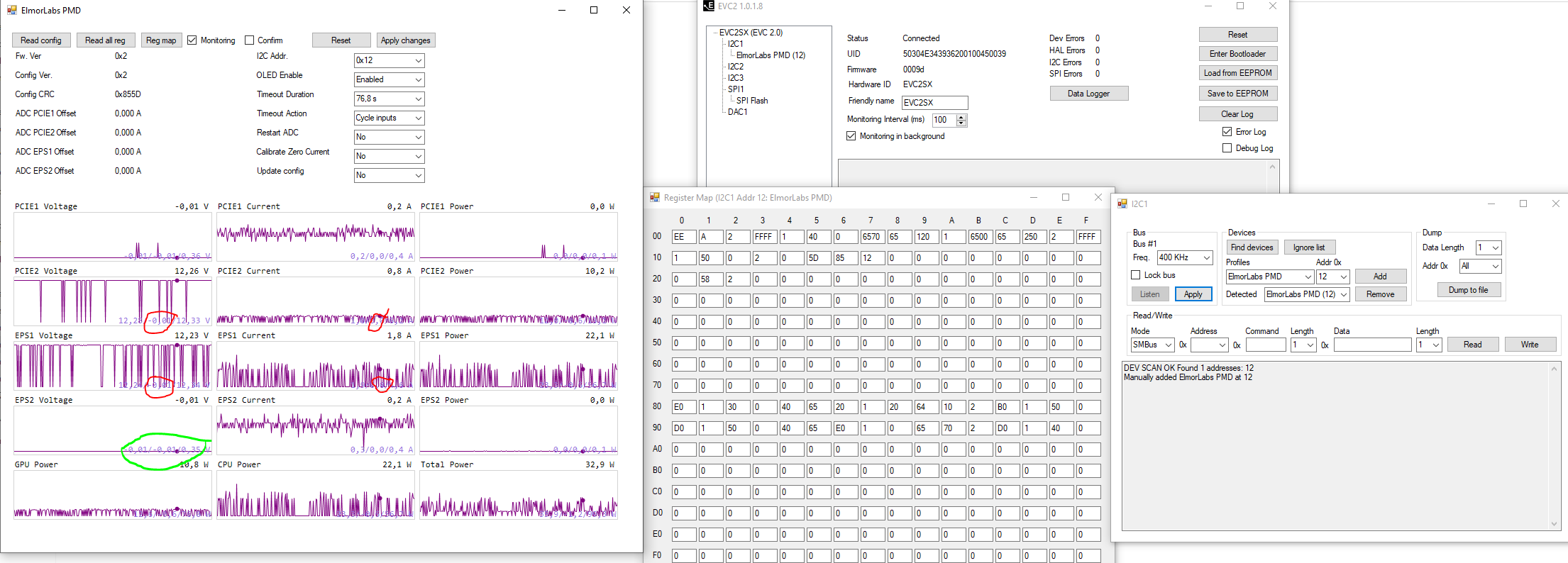
Quote from Moritz Maira Jerkel on 2021-12-15, 04:41I updated to the newer firmware 0009d.
It has a big impact, but it is still not there.
Sometimes the voltages from PCIe2 and EPS1 stay stable for 50s...sometimes only for 5s. But greatly improved compared to 0009b.
Current is less stable then voltage, but also much better then with the old firmware.
400kHz does "work", but it reads voltage and current nearly as bad as 0009b does.
The unoccupied PCIe1 and EPS2 readings change to a "mostly flat" line under 400kHz? I'm not sure if this is good or bad. 😉
I guess I could somewhat use the PMD with 100kHz and ignore the dips to 0W. But I woudl greadly appreciate, if you would continue updating it....or giving me another solution.
I wrapped tinfoil around the I2C cables, but it didn't do anything....looks cooler. 😉
When I go to 500ms monitoring intervall, I don't get nearly as many dips....But I'm not sure, if it is more stable, or if it is just 1/5th of the chance, to butcher the read.
I updated to the newer firmware 0009d.
It has a big impact, but it is still not there.
Sometimes the voltages from PCIe2 and EPS1 stay stable for 50s...sometimes only for 5s. But greatly improved compared to 0009b.
Current is less stable then voltage, but also much better then with the old firmware.
400kHz does "work", but it reads voltage and current nearly as bad as 0009b does.
The unoccupied PCIe1 and EPS2 readings change to a "mostly flat" line under 400kHz? I'm not sure if this is good or bad. 😉
I guess I could somewhat use the PMD with 100kHz and ignore the dips to 0W. But I woudl greadly appreciate, if you would continue updating it....or giving me another solution.
I wrapped tinfoil around the I2C cables, but it didn't do anything....looks cooler. 😉
When I go to 500ms monitoring intervall, I don't get nearly as many dips....But I'm not sure, if it is more stable, or if it is just 1/5th of the chance, to butcher the read.
Uploaded files: