The forum is currently inactive due to too much AI spam.
EVC2 Beta Software

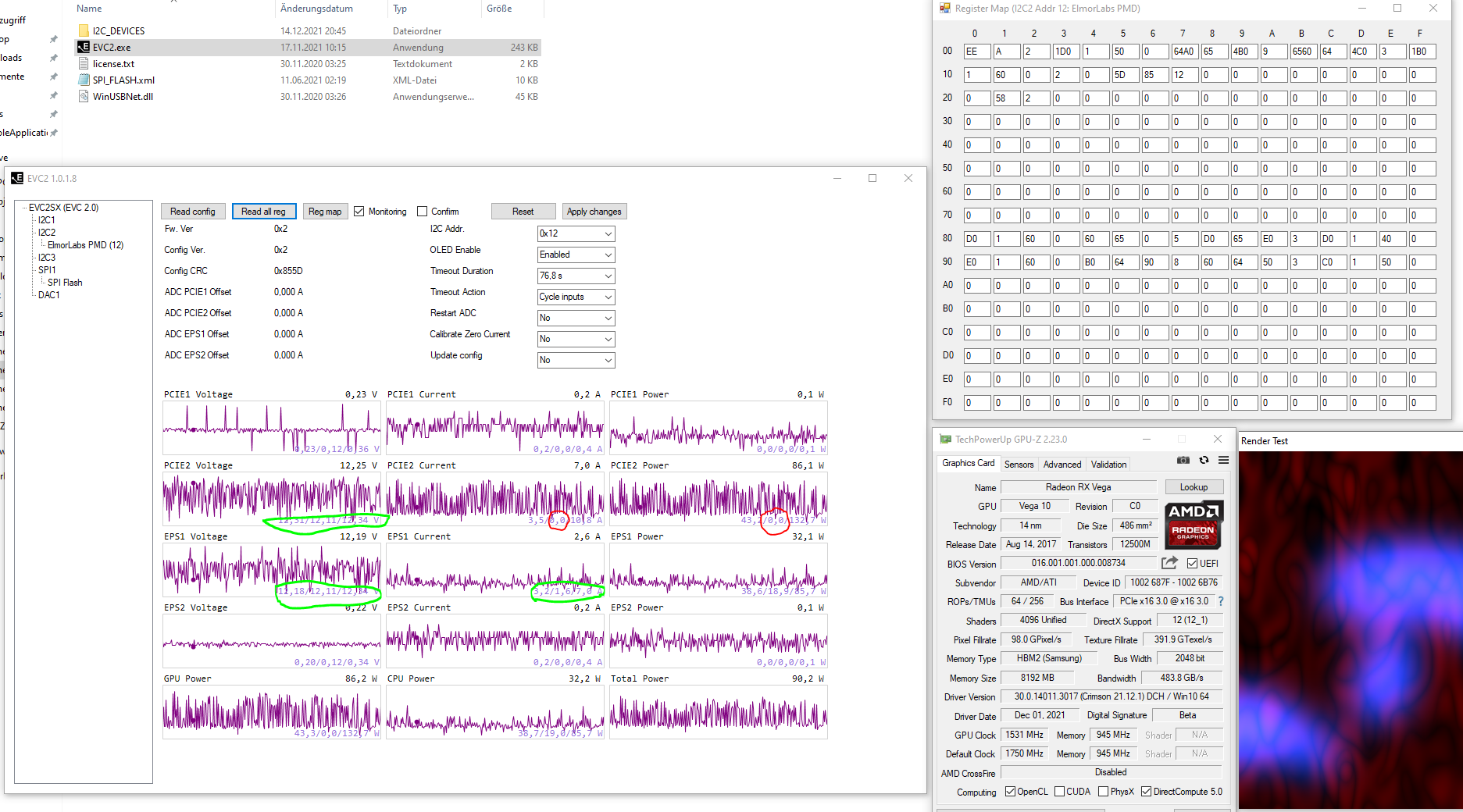
Quote from Moritz Maira Jerkel on 2021-12-15, 05:29I switched from the 3Pin cable that came with the PMD(50cm) to a shorter one(about 40cm)...and I used I²C2....plus I wrapped the 3 cables in tinfoil too. 😉
Huge improvement!
It is running for a few minutes now, and the voltage of PCIe2 and EPS1 have not droped once, to unrealistic values.
EPS current has not droped to 0A....PCIe2 current has droped to 0A a few times, but only from time to time(I have the Render Test from GPU-Z running).
Maybe I will use an even shorter cable in the future.
Even 400kHz seems to work now.
No errors and no voltage drops.. the same 0A drops on PCIe2 like with 100kHz, but only every 15s(less frequent then with the 50cm cables).
I switched from the 3Pin cable that came with the PMD(50cm) to a shorter one(about 40cm)...and I used I²C2....plus I wrapped the 3 cables in tinfoil too. 😉
Huge improvement!
It is running for a few minutes now, and the voltage of PCIe2 and EPS1 have not droped once, to unrealistic values.
EPS current has not droped to 0A....PCIe2 current has droped to 0A a few times, but only from time to time(I have the Render Test from GPU-Z running).
Maybe I will use an even shorter cable in the future.
Even 400kHz seems to work now.
No errors and no voltage drops.. the same 0A drops on PCIe2 like with 100kHz, but only every 15s(less frequent then with the 50cm cables).
Uploaded files:
Quote from Moritz Maira Jerkel on 2021-12-15, 06:48I did a quick and dirty test, but so far so good. 🙂
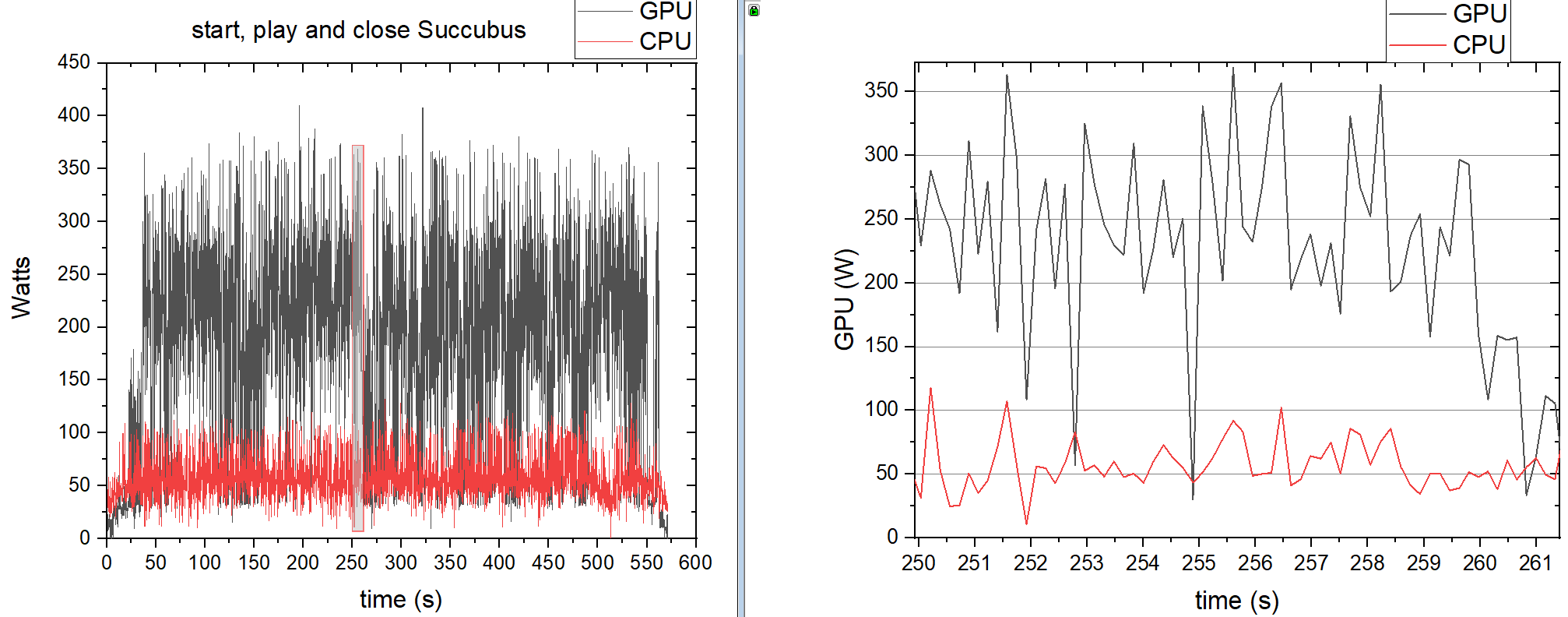
HWInfo was about 54W avg CPU Package.
GPU was about 200W (MSI Afterburner) and 72W core power and 161W Asic/soc power(HWInfo).
The Data from the PMD(without start and closing of the game) is 58W on avg for the CPU and 204W on avarage for the GPU(just 2x8Pin PCIe, without slot power).
I did a quick and dirty test, but so far so good. 🙂
HWInfo was about 54W avg CPU Package.
GPU was about 200W (MSI Afterburner) and 72W core power and 161W Asic/soc power(HWInfo).
The Data from the PMD(without start and closing of the game) is 58W on avg for the CPU and 204W on avarage for the GPU(just 2x8Pin PCIe, without slot power).
Uploaded files:

Quote from elmor on 2021-12-15, 13:00Quote from Moritz Maira Jerkel on 2021-12-15, 04:41I updated to the newer firmware 0009d.
It has a big impact, but it is still not there.
Sometimes the voltages from PCIe2 and EPS1 stay stable for 50s...sometimes only for 5s. But greatly improved compared to 0009b.
Current is less stable then voltage, but also much better then with the old firmware.
400kHz does "work", but it reads voltage and current nearly as bad as 0009b does.
The unoccupied PCIe1 and EPS2 readings change to a "mostly flat" line under 400kHz? I'm not sure if this is good or bad.
I guess I could somewhat use the PMD with 100kHz and ignore the dips to 0W. But I woudl greadly appreciate, if you would continue updating it....or giving me another solution.
I wrapped tinfoil around the I2C cables, but it didn't do anything....looks cooler.
When I go to 500ms monitoring intervall, I don't get nearly as many dips....But I'm not sure, if it is more stable, or if it is just 1/5th of the chance, to butcher the read.
Ok, at least a step in the right direction. Can you also test again with I2C2? I'm still looking into what could cause this in your case but fact that it improved with the 0009d firmware gives me some clues.
edit: I missed the additional new posts. It does seem like the I2C margin is a bit worse in your case (as it seems to help with a shorter wire). It might be possible to tune this, will have a look. It would also be possible to add retry configuration in case a read fails.

Quote from Moritz Maira Jerkel on 2021-12-15, 04:41I updated to the newer firmware 0009d.
It has a big impact, but it is still not there.
Sometimes the voltages from PCIe2 and EPS1 stay stable for 50s...sometimes only for 5s. But greatly improved compared to 0009b.
Current is less stable then voltage, but also much better then with the old firmware.
400kHz does "work", but it reads voltage and current nearly as bad as 0009b does.
The unoccupied PCIe1 and EPS2 readings change to a "mostly flat" line under 400kHz? I'm not sure if this is good or bad.
I guess I could somewhat use the PMD with 100kHz and ignore the dips to 0W. But I woudl greadly appreciate, if you would continue updating it....or giving me another solution.
I wrapped tinfoil around the I2C cables, but it didn't do anything....looks cooler.
When I go to 500ms monitoring intervall, I don't get nearly as many dips....But I'm not sure, if it is more stable, or if it is just 1/5th of the chance, to butcher the read.
Ok, at least a step in the right direction. Can you also test again with I2C2? I'm still looking into what could cause this in your case but fact that it improved with the 0009d firmware gives me some clues.
edit: I missed the additional new posts. It does seem like the I2C margin is a bit worse in your case (as it seems to help with a shorter wire). It might be possible to tune this, will have a look. It would also be possible to add retry configuration in case a read fails.
Quote from Moritz Maira Jerkel on 2021-12-15, 19:11I will try and short the wire to 10cm..... some other day. 😉
For now, I'm happy, that it is working like this. 🙂
Q1: Will there be a release of the oscilloscope feature soon?
Q2: How low can the monitoring interval go? Right now, 100ms seems to be the limit. Will this be reduced in future software versions?
I will try and short the wire to 10cm..... some other day. 😉
For now, I'm happy, that it is working like this. 🙂
Q1: Will there be a release of the oscilloscope feature soon?
Q2: How low can the monitoring interval go? Right now, 100ms seems to be the limit. Will this be reduced in future software versions?
Quote from elmor on 2021-12-15, 19:58Quote from Moritz Maira Jerkel on 2021-12-15, 19:11I will try and short the wire to 10cm..... some other day.
For now, I'm happy, that it is working like this.
Q1: Will there be a release of the oscilloscope feature soon?
Q2: How low can the monitoring interval go? Right now, 100ms seems to be the limit. Will this be reduced in future software versions?
The 2.54mm jumper wires included with EVC2 should fit the PMD connector if you want to test that. Currently monitoring interval in the EVC2 software is limited to 100ms. I'm looking at ways to reduce it. You can try the scope software here: https://1drv.ms/u/s!Atmpv-6qHr_61JE9RL-5r3l8_YyZkw?e=GUSVRe . The prerequisite is FW 0009d which you already have.

Quote from Moritz Maira Jerkel on 2021-12-15, 19:11I will try and short the wire to 10cm..... some other day.
For now, I'm happy, that it is working like this.
Q1: Will there be a release of the oscilloscope feature soon?
Q2: How low can the monitoring interval go? Right now, 100ms seems to be the limit. Will this be reduced in future software versions?
The 2.54mm jumper wires included with EVC2 should fit the PMD connector if you want to test that. Currently monitoring interval in the EVC2 software is limited to 100ms. I'm looking at ways to reduce it. You can try the scope software here: https://1drv.ms/u/s!Atmpv-6qHr_61JE9RL-5r3l8_YyZkw?e=GUSVRe . The prerequisite is FW 0009d which you already have.
Quote from elmor on 2021-12-16, 17:42Hello @moritz-maira-jerkel,
I believe I managed to improve the margin with this firmware (0009e): https://1drv.ms/u/s!Atmpv-6qHr_61NMY4EpV9P9quzTj2w?e=8iS2aD . You may also try this updated software which adds a retry configuration option and allows to set monitoring interval down to 10 ms: https://1drv.ms/u/s!Atmpv-6qHr_61NMbCHDr4dsDzmAbaQ?e=O3uo6n
Hello @moritz-maira-jerkel,
I believe I managed to improve the margin with this firmware (0009e): https://1drv.ms/u/s!Atmpv-6qHr_61NMY4EpV9P9quzTj2w?e=8iS2aD . You may also try this updated software which adds a retry configuration option and allows to set monitoring interval down to 10 ms: https://1drv.ms/u/s!Atmpv-6qHr_61NMbCHDr4dsDzmAbaQ?e=O3uo6n
Quote from Moritz Maira Jerkel on 2021-12-23, 11:29Hello,
I tried the 0009e firmware out and the Software update too.
I don't think, that the firmware is improving things for me. I would even say, that it got worse when using I2C_1.....I2C_2 was fine before(40cm cable) and it is fine now.
The included 50cm cable is still awefull.
Even using a 6cm cable, does not make things flawless on I2C_1....I think it got better then with 40cm, but it is hard to quantify.
On I2C_2, I'm able to use 10ms intervall with 0 retry count. 🙂
This is nice. 🙂
The PCIe_2 current is still droping to 0A from time to time, but I don't think this is a faulty I2C reading anymore.
When I had faulty readings, I could observe an FFFF in the Register Map. When PCIe_2 current is droping to 0A now(short cable and I2C_2), I can not observe FFFF, so I guess the PMD is messuring 0A....mostly on idle, but sometimes under load too.
Maybe that is realistic? Maybe not? But it is not a big deal. I'm fine with it.
I did create a way to messure 12V going into the motherbard through 24-ATX.
I used a, 24-ATX extension cable, some old Molex, P4 and P8 cables and created an abomination of colerfull cables, adapters and awefull soldering skills.
But it worked. 🙂
Next thing will be, to add the option for 3.3 and 5V messurements....And cutting open an riser cable to get PCie Slot power.
I dread the soldering part. 🙁
The oscilloscope is working, but it is of little use, if I can't record or use trigger. Still nice to see it. 🙂
Merry Christmas and a Happy New Year 🙂
Hello,
I tried the 0009e firmware out and the Software update too.
I don't think, that the firmware is improving things for me. I would even say, that it got worse when using I2C_1.....I2C_2 was fine before(40cm cable) and it is fine now.
The included 50cm cable is still awefull.
Even using a 6cm cable, does not make things flawless on I2C_1....I think it got better then with 40cm, but it is hard to quantify.
On I2C_2, I'm able to use 10ms intervall with 0 retry count. 🙂
This is nice. 🙂
The PCIe_2 current is still droping to 0A from time to time, but I don't think this is a faulty I2C reading anymore.
When I had faulty readings, I could observe an FFFF in the Register Map. When PCIe_2 current is droping to 0A now(short cable and I2C_2), I can not observe FFFF, so I guess the PMD is messuring 0A....mostly on idle, but sometimes under load too.
Maybe that is realistic? Maybe not? But it is not a big deal. I'm fine with it.
I did create a way to messure 12V going into the motherbard through 24-ATX.
I used a, 24-ATX extension cable, some old Molex, P4 and P8 cables and created an abomination of colerfull cables, adapters and awefull soldering skills.
But it worked. 🙂
Next thing will be, to add the option for 3.3 and 5V messurements....And cutting open an riser cable to get PCie Slot power.
I dread the soldering part. 🙁
The oscilloscope is working, but it is of little use, if I can't record or use trigger. Still nice to see it. 🙂
Merry Christmas and a Happy New Year 🙂
Quote from Moritz Maira Jerkel on 2022-01-19, 20:26Hello,
I wanted to give a quick update.
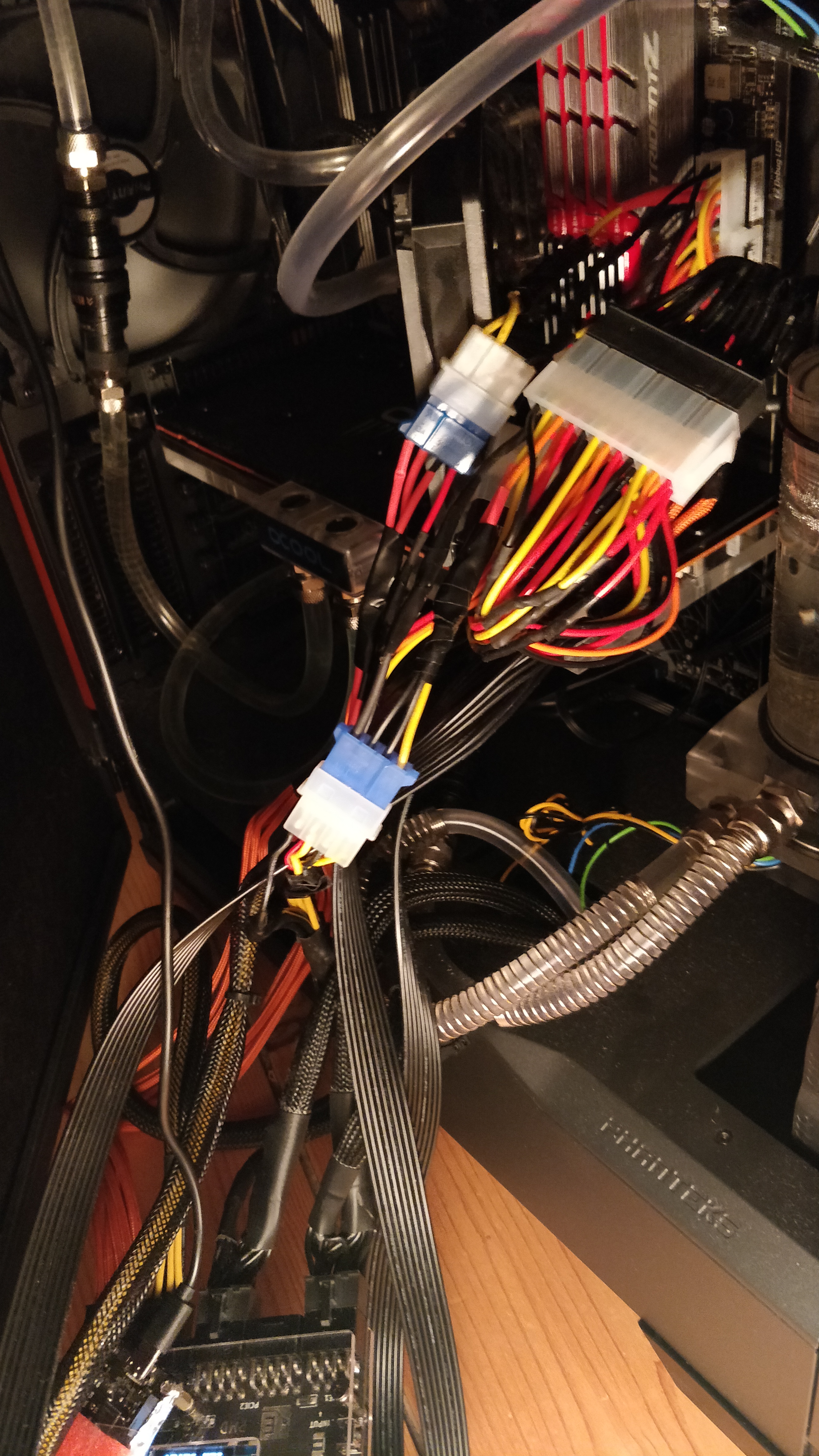
I didn't get to the riser cable yet, but I did finish the ATX extension.
Here it is with 5V and 12V captured by the PMD:
And here it is inside of the PC:
Since I only bought one PMD, I can't capture everything at once. So I was doing all the tests twice.
One Time with:
nothing in PCie1 : both PCIe 6+2 in PCIe2 : 3.3V ATX in EPS1 : 12V 8Pin in EPS2
and the other time:
1xPCIe 6+2 in PCIe1 : 1xPCIe6+2 in PCIe2 : 12V ATX in EPS1 : 5V ATX in EPS2
I was using an externel power measurement at the wall, for comparison. It is old, but it is reading realistic numbers, when testet with light bulbs, or heaters. I should be sufficient.
The only thing not going through the PMD is the water pump. At minimum PWM signal it is about 1W of difference plugged/unplugged and 15W at maximum speed. I was using it at nearly minimum PWM for these tests, so 1W can be deducted.
Having the PMD in the system did change the external power reading a bit. Idle power was up by about 1W with PMD setup 2 and about 2W with Setup 1.
I guess the resistance is higher, when both 6+2 Cable are going through one PMD Channel and when the 12V EPS Cable is going through the PMD.
And the PMD itself needs a little bit of power....so PMD+pump increase the external power reading by 2-3W.
Power supply is a Corsair RM750. I took an efficiency curve from a review to estimate, what the PMD should read as a sum, based on the external reading.
PMD seems to read a little high, but close.
Using only the PMD PCIe2 Channel for the 6+2 cables, is reading about 3.5W more at Idle, then splitting them to Channel 1+2. This is a big difference in percent(65% more). But when under load, the difference is negligible.
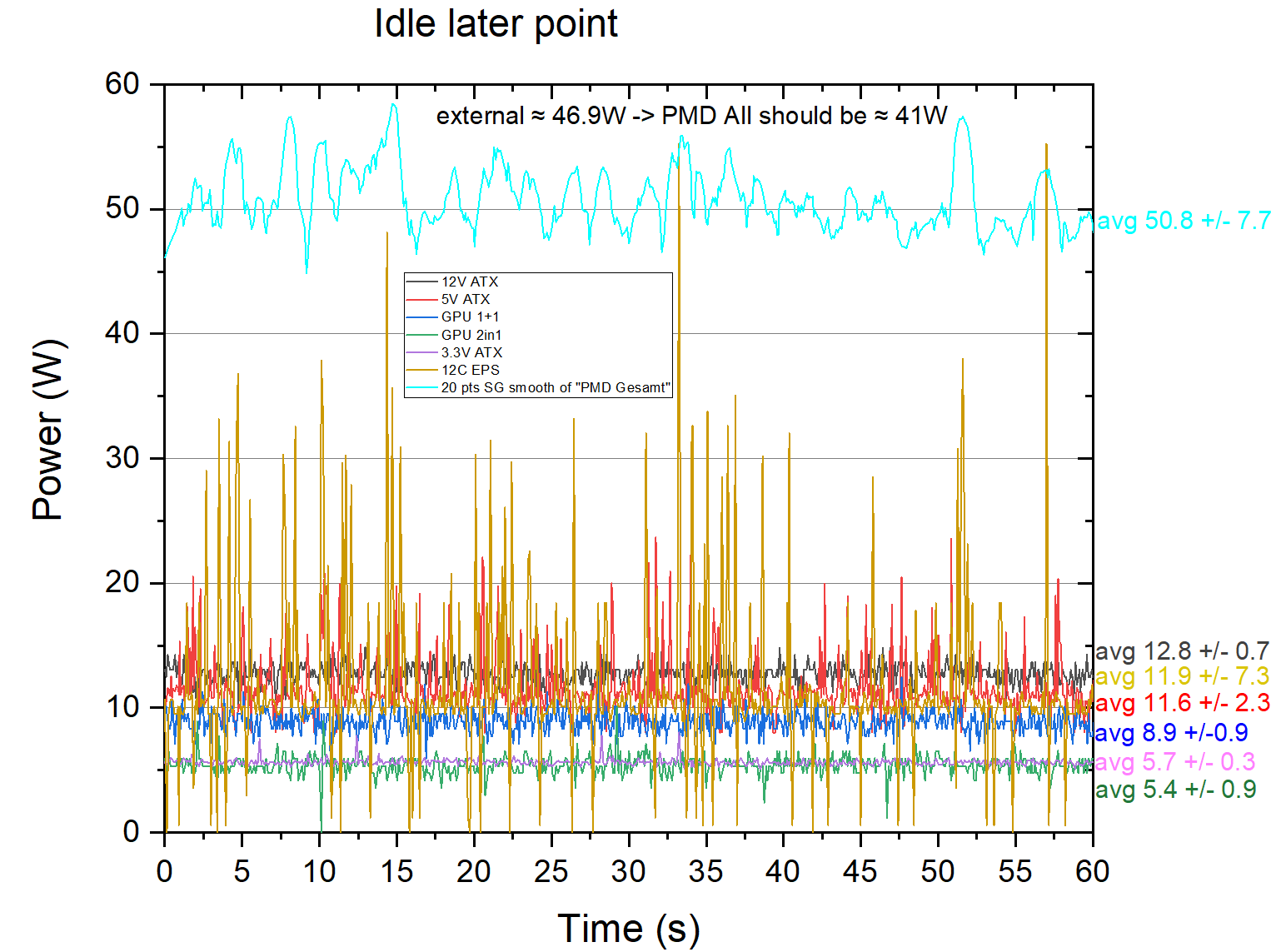
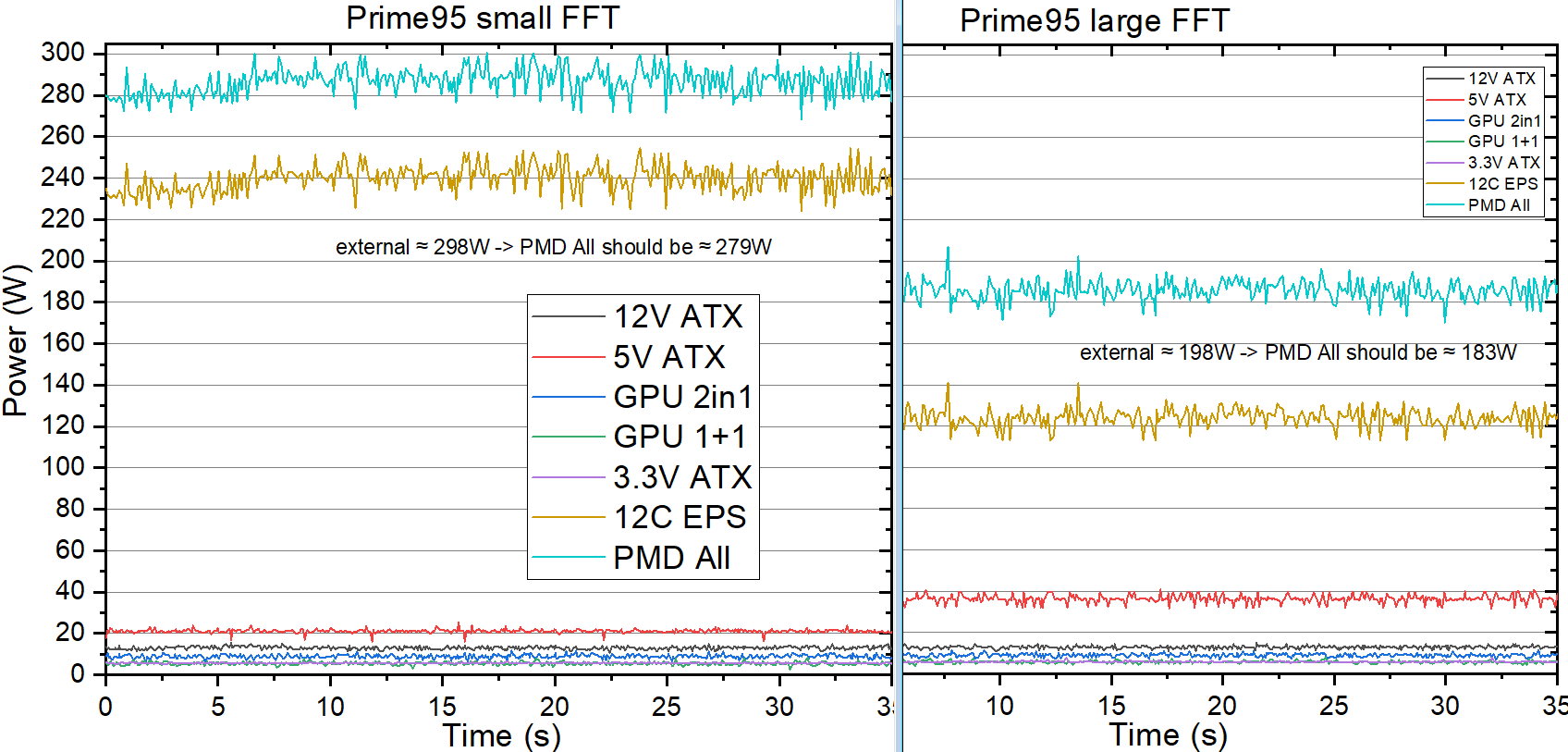
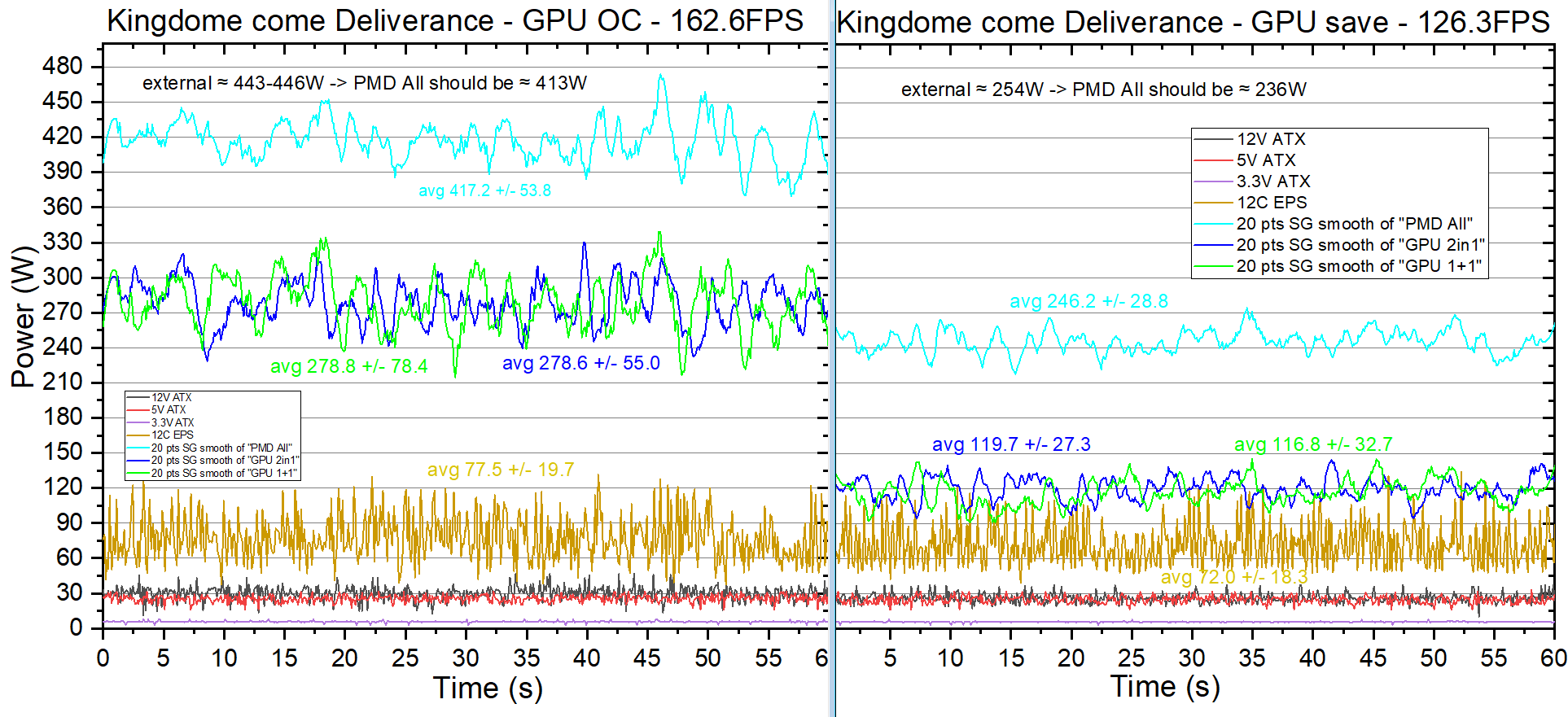
Adding everything up(avg for GPU readings), leads to the following numbers:
Idle:
The external reading is about 46.9W, after substracting pump and Power supply efficiency, it should be about 41W
PMD readings add up to 50.8W +- 7.7W
Prime95 small FFT
286.6W +/- 6.5 (should be 279W)
Prime95 large FFT
185.8W +/- 5.3 (should be 183W)
Kingdome come Deliverance GPU "OC"
417.2W +/- 53.8 (should be 413W)
Kingdome come Deliverance GPU "save energy"
246.2W +/- 28.8 (should be 236W)
I did a lot of other tests, but evaluating the data manually is laborious. 🙁
@elmor
I do have one request für the EVC2 Software.
Could you add an option to set an optional capture time in the Data logger?
As if now, I'm selecting a file, click "start Logging"..I get a message, asking me if I'm ok to override the file....and them I try to klick "OK" with one hand and the capture hotkey for a game that I'm trying to capture with the other hand....this does work and I'm okay with it.
But stopping the PMD Logging is stressfull and unrealiable. The Frametime Capture at the gaming PC can be set to X seconds ...but I need a Stopwatch to know when to stop the PMD logging and I only have 2 Arms and one pair of eyes.
Please add the option, to have the PMD logging running for X seconds after confirming that I want to override the file.
Edit: The System in this tests ist a Ryzen 3950X(PBO), MSI B550 Carbon Gaming Wifi, 4x8 3790 CL14(all timings optimized) Samsung B-Die@1,52V, Radeon VII 16GB, Corsair RM750.
CPU and GPU are watercooled. 7x140mm Fans+ 1x120mm fan(cooling the DRam).
1x420mm Radiator+1x280mm Radiator. Pump is a Laing DDC 3.2 PWM
Hello,
I wanted to give a quick update.
I didn't get to the riser cable yet, but I did finish the ATX extension.
Here it is with 5V and 12V captured by the PMD:
And here it is inside of the PC:
Since I only bought one PMD, I can't capture everything at once. So I was doing all the tests twice.
One Time with:
nothing in PCie1 : both PCIe 6+2 in PCIe2 : 3.3V ATX in EPS1 : 12V 8Pin in EPS2
and the other time:
1xPCIe 6+2 in PCIe1 : 1xPCIe6+2 in PCIe2 : 12V ATX in EPS1 : 5V ATX in EPS2
I was using an externel power measurement at the wall, for comparison. It is old, but it is reading realistic numbers, when testet with light bulbs, or heaters. I should be sufficient.
The only thing not going through the PMD is the water pump. At minimum PWM signal it is about 1W of difference plugged/unplugged and 15W at maximum speed. I was using it at nearly minimum PWM for these tests, so 1W can be deducted.
Having the PMD in the system did change the external power reading a bit. Idle power was up by about 1W with PMD setup 2 and about 2W with Setup 1.
I guess the resistance is higher, when both 6+2 Cable are going through one PMD Channel and when the 12V EPS Cable is going through the PMD.
And the PMD itself needs a little bit of power....so PMD+pump increase the external power reading by 2-3W.
Power supply is a Corsair RM750. I took an efficiency curve from a review to estimate, what the PMD should read as a sum, based on the external reading.
PMD seems to read a little high, but close.
Using only the PMD PCIe2 Channel for the 6+2 cables, is reading about 3.5W more at Idle, then splitting them to Channel 1+2. This is a big difference in percent(65% more). But when under load, the difference is negligible.
Adding everything up(avg for GPU readings), leads to the following numbers:
Idle:
The external reading is about 46.9W, after substracting pump and Power supply efficiency, it should be about 41W
PMD readings add up to 50.8W +- 7.7W
Prime95 small FFT
286.6W +/- 6.5 (should be 279W)
Prime95 large FFT
185.8W +/- 5.3 (should be 183W)
Kingdome come Deliverance GPU "OC"
417.2W +/- 53.8 (should be 413W)
Kingdome come Deliverance GPU "save energy"
246.2W +/- 28.8 (should be 236W)
I did a lot of other tests, but evaluating the data manually is laborious. 🙁
I do have one request für the EVC2 Software.
Could you add an option to set an optional capture time in the Data logger?
As if now, I'm selecting a file, click "start Logging"..I get a message, asking me if I'm ok to override the file....and them I try to klick "OK" with one hand and the capture hotkey for a game that I'm trying to capture with the other hand....this does work and I'm okay with it.
But stopping the PMD Logging is stressfull and unrealiable. The Frametime Capture at the gaming PC can be set to X seconds ...but I need a Stopwatch to know when to stop the PMD logging and I only have 2 Arms and one pair of eyes.
Please add the option, to have the PMD logging running for X seconds after confirming that I want to override the file.
Edit: The System in this tests ist a Ryzen 3950X(PBO), MSI B550 Carbon Gaming Wifi, 4x8 3790 CL14(all timings optimized) Samsung B-Die@1,52V, Radeon VII 16GB, Corsair RM750.
CPU and GPU are watercooled. 7x140mm Fans+ 1x120mm fan(cooling the DRam).
1x420mm Radiator+1x280mm Radiator. Pump is a Laing DDC 3.2 PWM
Uploaded files: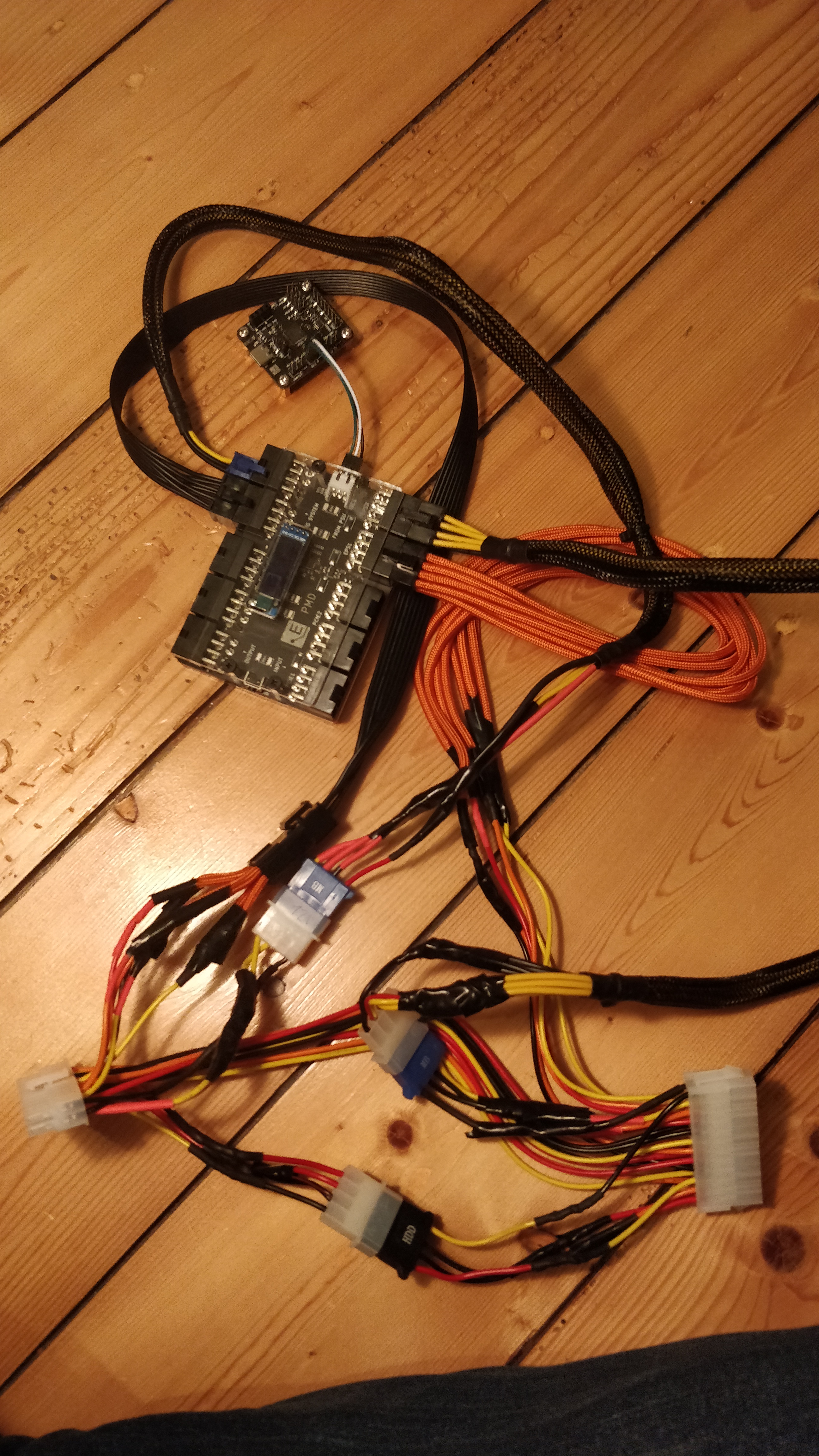
Quote from elmor on 2022-01-24, 23:24Quote from Moritz Maira Jerkel on 2022-01-19, 20:26Hello,
I wanted to give a quick update.
I didn't get to the riser cable yet, but I did finish the ATX extension.
Here it is with 5V and 12V captured by the PMD:
And here it is inside of the PC:
Since I only bought one PMD, I can't capture everything at once. So I was doing all the tests twice.
One Time with:
nothing in PCie1 : both PCIe 6+2 in PCIe2 : 3.3V ATX in EPS1 : 12V 8Pin in EPS2
and the other time:
1xPCIe 6+2 in PCIe1 : 1xPCIe6+2 in PCIe2 : 12V ATX in EPS1 : 5V ATX in EPS2
I was using an externel power measurement at the wall, for comparison. It is old, but it is reading realistic numbers, when testet with light bulbs, or heaters. I should be sufficient.
The only thing not going through the PMD is the water pump. At minimum PWM signal it is about 1W of difference plugged/unplugged and 15W at maximum speed. I was using it at nearly minimum PWM for these tests, so 1W can be deducted.
Having the PMD in the system did change the external power reading a bit. Idle power was up by about 1W with PMD setup 2 and about 2W with Setup 1.
I guess the resistance is higher, when both 6+2 Cable are going through one PMD Channel and when the 12V EPS Cable is going through the PMD.
And the PMD itself needs a little bit of power....so PMD+pump increase the external power reading by 2-3W.
Power supply is a Corsair RM750. I took an efficiency curve from a review to estimate, what the PMD should read as a sum, based on the external reading.
PMD seems to read a little high, but close.
Using only the PMD PCIe2 Channel for the 6+2 cables, is reading about 3.5W more at Idle, then splitting them to Channel 1+2. This is a big difference in percent(65% more). But when under load, the difference is negligible.
Adding everything up(avg for GPU readings), leads to the following numbers:
Idle:
The external reading is about 46.9W, after substracting pump and Power supply efficiency, it should be about 41W
PMD readings add up to 50.8W +- 7.7W
Prime95 small FFT
286.6W +/- 6.5 (should be 279W)
Prime95 large FFT
185.8W +/- 5.3 (should be 183W)
Kingdome come Deliverance GPU "OC"
417.2W +/- 53.8 (should be 413W)
Kingdome come Deliverance GPU "save energy"
246.2W +/- 28.8 (should be 236W)
I did a lot of other tests, but evaluating the data manually is laborious.
@elmor
I do have one request für the EVC2 Software.
Could you add an option to set an optional capture time in the Data logger?
As if now, I'm selecting a file, click "start Logging"..I get a message, asking me if I'm ok to override the file....and them I try to klick "OK" with one hand and the capture hotkey for a game that I'm trying to capture with the other hand....this does work and I'm okay with it.
But stopping the PMD Logging is stressfull and unrealiable. The Frametime Capture at the gaming PC can be set to X seconds ...but I need a Stopwatch to know when to stop the PMD logging and I only have 2 Arms and one pair of eyes.
Please add the option, to have the PMD logging running for X seconds after confirming that I want to override the file.
Edit: The System in this tests ist a Ryzen 3950X(PBO), MSI B550 Carbon Gaming Wifi, 4x8 3790 CL14(all timings optimized) Samsung B-Die@1,52V, Radeon VII 16GB, Corsair RM750.
CPU and GPU are watercooled. 7x140mm Fans+ 1x120mm fan(cooling the DRam).
1x420mm Radiator+1x280mm Radiator. Pump is a Laing DDC 3.2 PWM
Hello, thank you for the updates. Sorry I didn't notice them until now. I would suggest you show up at the Discord channel if you wish to discuss this further with faster response time.
The power readings you're getting are pretty decent honestly. It's within the margin of error for this device. At smaller currents/power any offset error will cause a large % error like you see.
Regarding your software request I will try to add that functionality to the next version.
/Jon

Quote from Moritz Maira Jerkel on 2022-01-19, 20:26Hello,
I wanted to give a quick update.
I didn't get to the riser cable yet, but I did finish the ATX extension.
Here it is with 5V and 12V captured by the PMD:
And here it is inside of the PC:
Since I only bought one PMD, I can't capture everything at once. So I was doing all the tests twice.
One Time with:
nothing in PCie1 : both PCIe 6+2 in PCIe2 : 3.3V ATX in EPS1 : 12V 8Pin in EPS2
and the other time:
1xPCIe 6+2 in PCIe1 : 1xPCIe6+2 in PCIe2 : 12V ATX in EPS1 : 5V ATX in EPS2
I was using an externel power measurement at the wall, for comparison. It is old, but it is reading realistic numbers, when testet with light bulbs, or heaters. I should be sufficient.
The only thing not going through the PMD is the water pump. At minimum PWM signal it is about 1W of difference plugged/unplugged and 15W at maximum speed. I was using it at nearly minimum PWM for these tests, so 1W can be deducted.
Having the PMD in the system did change the external power reading a bit. Idle power was up by about 1W with PMD setup 2 and about 2W with Setup 1.
I guess the resistance is higher, when both 6+2 Cable are going through one PMD Channel and when the 12V EPS Cable is going through the PMD.
And the PMD itself needs a little bit of power....so PMD+pump increase the external power reading by 2-3W.
Power supply is a Corsair RM750. I took an efficiency curve from a review to estimate, what the PMD should read as a sum, based on the external reading.
PMD seems to read a little high, but close.
Using only the PMD PCIe2 Channel for the 6+2 cables, is reading about 3.5W more at Idle, then splitting them to Channel 1+2. This is a big difference in percent(65% more). But when under load, the difference is negligible.
Adding everything up(avg for GPU readings), leads to the following numbers:
Idle:
The external reading is about 46.9W, after substracting pump and Power supply efficiency, it should be about 41W
PMD readings add up to 50.8W +- 7.7W
Prime95 small FFT
286.6W +/- 6.5 (should be 279W)
Prime95 large FFT
185.8W +/- 5.3 (should be 183W)
Kingdome come Deliverance GPU "OC"
417.2W +/- 53.8 (should be 413W)
Kingdome come Deliverance GPU "save energy"
246.2W +/- 28.8 (should be 236W)
I did a lot of other tests, but evaluating the data manually is laborious.
I do have one request für the EVC2 Software.
Could you add an option to set an optional capture time in the Data logger?
As if now, I'm selecting a file, click "start Logging"..I get a message, asking me if I'm ok to override the file....and them I try to klick "OK" with one hand and the capture hotkey for a game that I'm trying to capture with the other hand....this does work and I'm okay with it.
But stopping the PMD Logging is stressfull and unrealiable. The Frametime Capture at the gaming PC can be set to X seconds ...but I need a Stopwatch to know when to stop the PMD logging and I only have 2 Arms and one pair of eyes.
Please add the option, to have the PMD logging running for X seconds after confirming that I want to override the file.
Edit: The System in this tests ist a Ryzen 3950X(PBO), MSI B550 Carbon Gaming Wifi, 4x8 3790 CL14(all timings optimized) Samsung B-Die@1,52V, Radeon VII 16GB, Corsair RM750.
CPU and GPU are watercooled. 7x140mm Fans+ 1x120mm fan(cooling the DRam).
1x420mm Radiator+1x280mm Radiator. Pump is a Laing DDC 3.2 PWM
Hello, thank you for the updates. Sorry I didn't notice them until now. I would suggest you show up at the Discord channel if you wish to discuss this further with faster response time.
The power readings you're getting are pretty decent honestly. It's within the margin of error for this device. At smaller currents/power any offset error will cause a large % error like you see.
Regarding your software request I will try to add that functionality to the next version.
/Jon

Quote from Mario Kriegsmann on 2022-01-30, 03:37Hi,
this EVC and PMD devices are simply awesome! Is there a chance that there will be something like a Profile-manager in the future? The EVC2.exe should be autostarted with windows (I can do that by myself) and the EVC2.exe should then load back all the values from the last session. So on which busses which device was connected and especially that all the logging I setup does then continue logging into my file I selected in the session before.
Background:
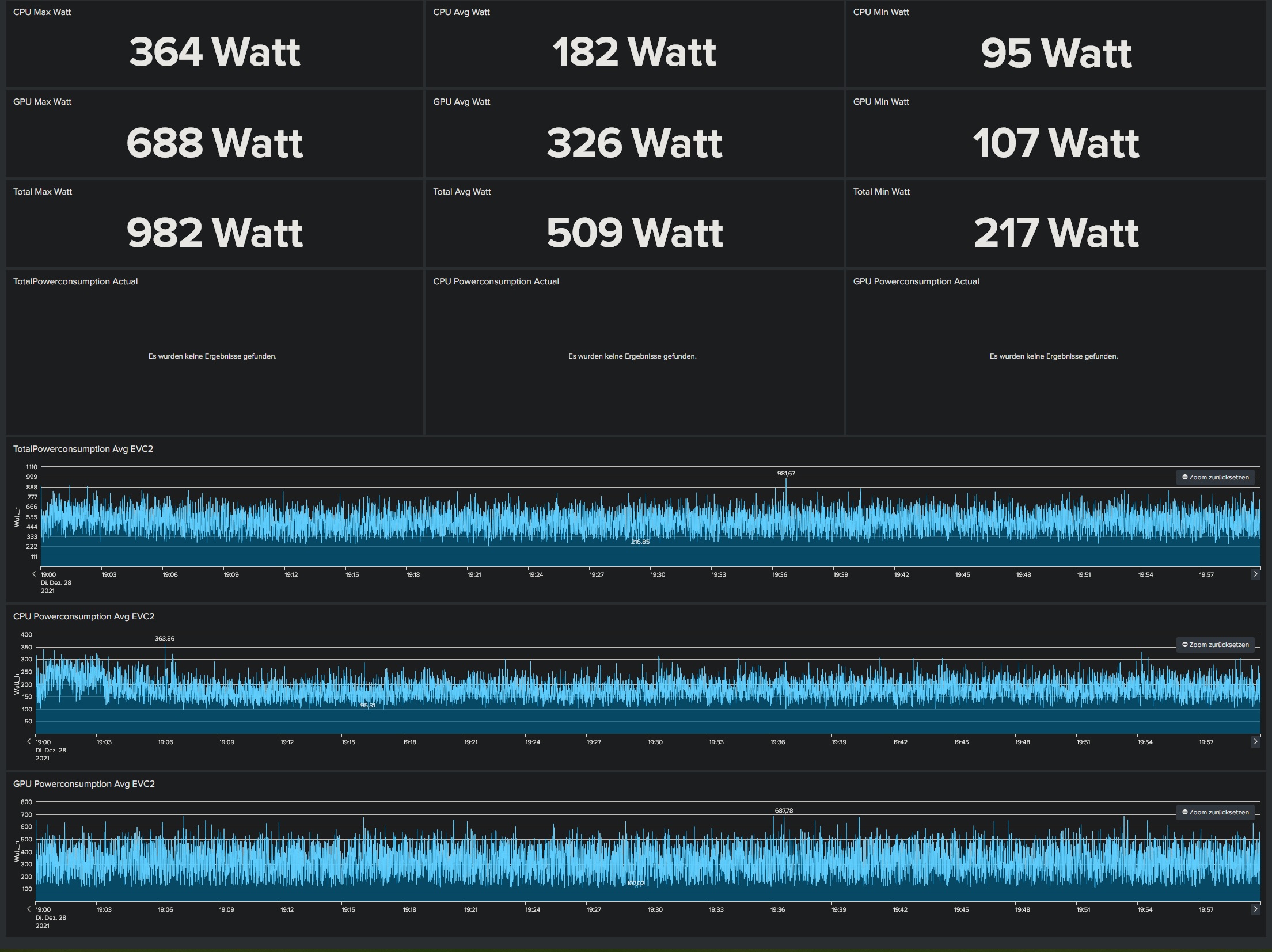
Iam planning to build the EVC2 and the PMD directly into my new Project. Especially the PMD device is so nice regarding all the monitoring stuff. I configured splunk picking up all the monitoring-logs and feeding into my Dashboard. There I can see all the informations which the PMD is getting in realtime from measuring. Actually it is very time consuming after a fresh reboot, everything to setup.
Hi,
this EVC and PMD devices are simply awesome! Is there a chance that there will be something like a Profile-manager in the future? The EVC2.exe should be autostarted with windows (I can do that by myself) and the EVC2.exe should then load back all the values from the last session. So on which busses which device was connected and especially that all the logging I setup does then continue logging into my file I selected in the session before.
Background:
Iam planning to build the EVC2 and the PMD directly into my new Project. Especially the PMD device is so nice regarding all the monitoring stuff. I configured splunk picking up all the monitoring-logs and feeding into my Dashboard. There I can see all the informations which the PMD is getting in realtime from measuring. Actually it is very time consuming after a fresh reboot, everything to setup.
Uploaded files: